Package Management
Install, update, and manage regional scenery packages.
XEarthLayer uses a package system to manage regional scenery from across the globe. Packages contain tile indices that tell XEarthLayer which areas have satellite imagery and what resources to download.
Available Regions
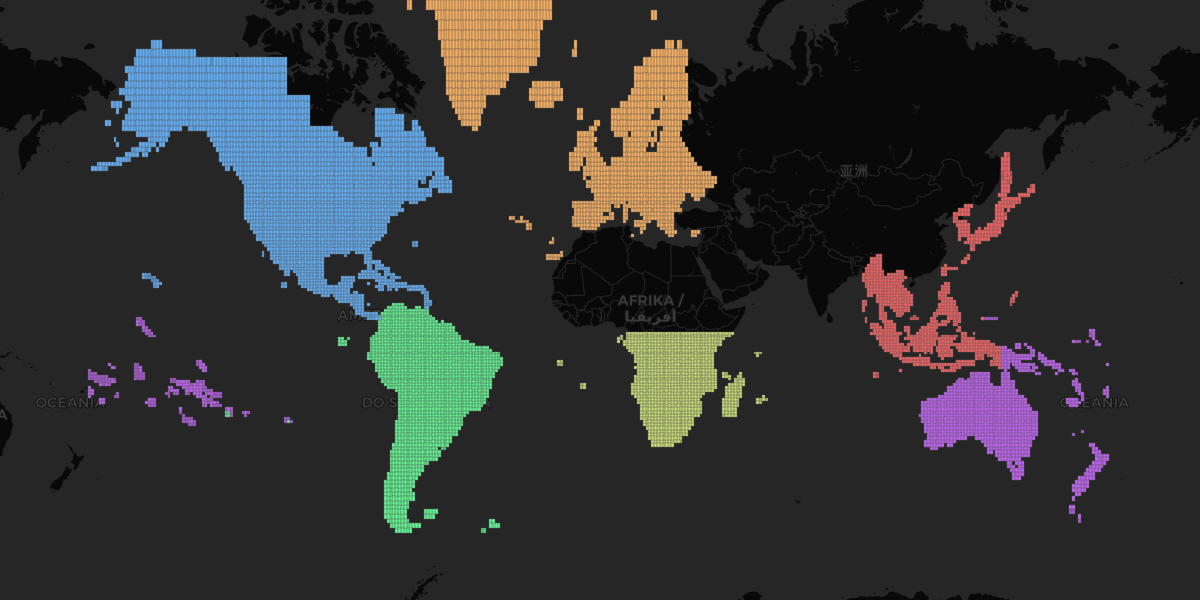
AF1 in cyan, AF2 in yellowgreen, AS3 in red, EU in orange, NA in blue, OC in purple, SA in green.
| Code | Region | Version | Coverage |
|---|---|---|---|
| AF1 | Africa - Part 1 | 0.1.0 | North Africa including Morocco, Algeria, Tunisia, Libya, Egypt, Sudan, South Sudan, Ethiopia, Somalia, Djibouti, Chad, Niger, Nigeria, Cameroon, Central African Republic, Mali, Senegal, Gambia, Guinea, Sierra Leone, Liberia, Ivory Coast, Ghana, Benin, Mauritania, Western Sahara |
| AF2 | Africa - Part 2 | 0.1.0 | Southern Africa including South Africa, Namibia, Botswana, Zimbabwe, Zambia, Mozambique, Madagascar, Tanzania, Kenya, DRC |
| AS3 | Asia - Part 3 | 0.1.0 | Indonesia, Malaysia, Philippines, Vietnam, Thailand, Japan, South Korea, Taiwan, Eastern Russia |
| EU | Europe | 0.1.1 | Western and Central Europe |
| NA | North America | 0.2.3 | United States, Canada, Caribbean |
| OC | Oceania | 0.2.0 | Australia, New Zealand, Fiji, French Polynesia, Papua New Guinea, Vanuatu, Solomon Islands |
| SA | South America | 0.2.0 | Complete continent including Falkland Islands |
Listing Packages
View installed and available packages:
xearthlayer packages listInstalling Packages
Install a regional package by its code:
xearthlayer packages install EUxearthlayer packages install NAUpdating Packages
Check for updates:
xearthlayer packages checkUpdate all packages:
xearthlayer packages updateUpdate a specific package:
xearthlayer packages update EURemoving Packages
Remove a package you no longer need:
xearthlayer packages remove EUPackage Library
XEarthLayer fetches package information from a library URL. The default library is hosted at:
https://xearthlayer.app/packages/xearthlayer_package_library.txt
You can configure a custom library URL:
xearthlayer config set packages.library_url https://example.com/library.txt